Google announced a small-business hub for the Gemini app on October 20, 2026, combining saved brand styles, marketing and finance tools, and app connections. The rollout is scheduled to begin globally for Gemini app users over the coming days.
The important question is not whether a chatbot can draft another advertisement. It is whether owners can reuse their business context without rebuilding a brief for every task. Google's documentation also reveals a distinction worth checking before connecting anything: a global rollout does not mean every integration works everywhere.
What changes with Gemini's saved brand style?
Owners can supply a website, brand kit, fonts or color palette. Google says Gemini retains that visual identity for subsequent assets generated with Nano Banana 2.1. The announcement also describes converting spreadsheets, receipts and purchase records into financial graphics and interactive models.
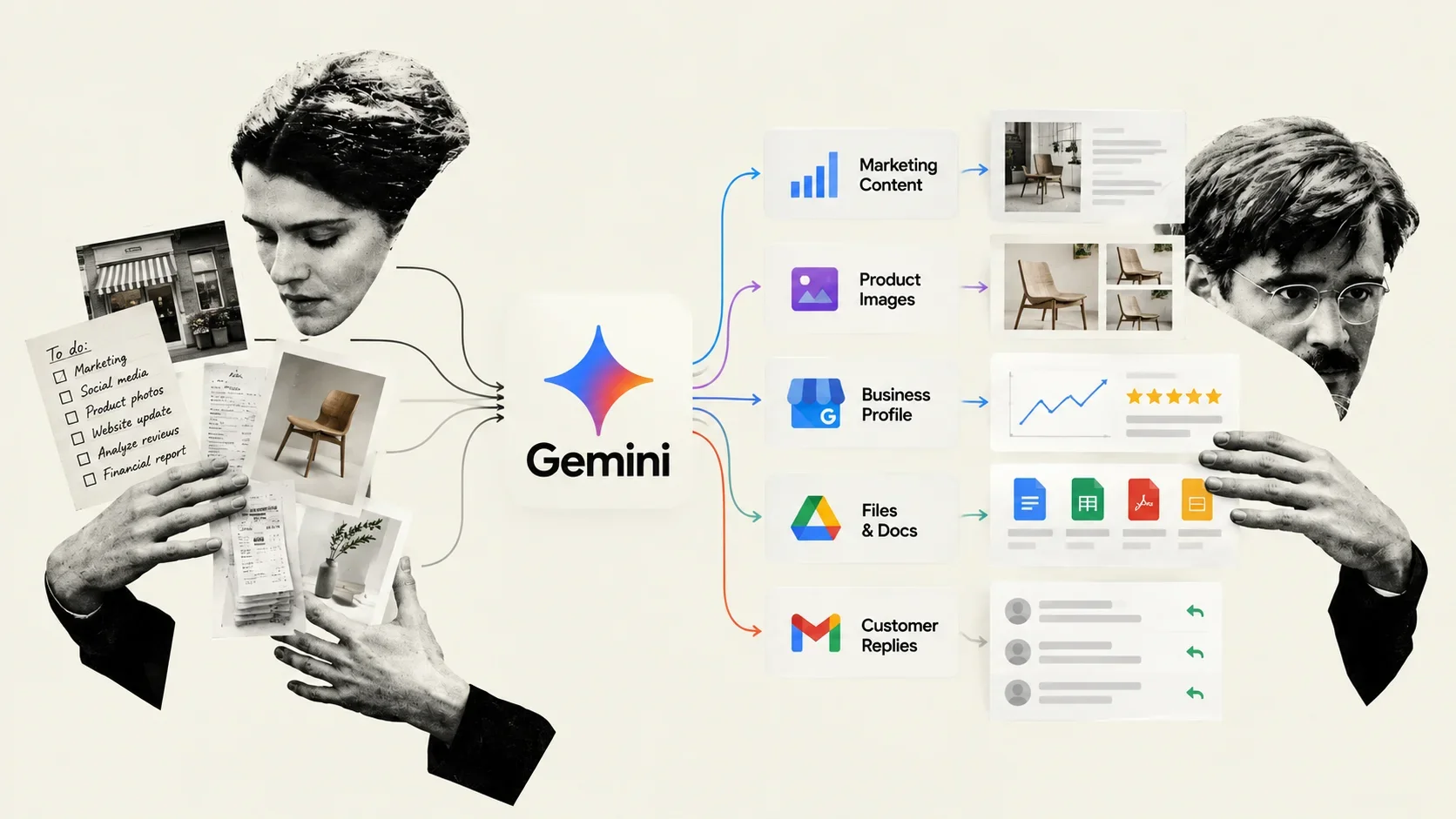
The potential benefit is less repetition: an owner could evaluate a campaign as a coordinated set of materials rather than separate image requests. That is a workflow advantage to test, not a guarantee that generated logos, product details or typography will need no correction.
Connected apps: check both capabilities and eligibility
Google's Connected Apps availability table lists Shopify functions including order processing, inventory tracking and product-listing creation. At publication, however, that integration is listed for personal Google Accounts, users aged 18 or older, the United States and English. An owner outside those conditions should not assume Shopify access simply because the broader hub is rolling out globally.
The creative-app documentation describes creating Canva designs, accessing existing projects and editing images generated in Gemini. It also lists limitations: Gemini cannot manage Canva Brand Kit assets, including uploaded logos, fonts and palettes, or export designs in different formats through that connected app.
Those boundaries matter. Supplying a brand style to Gemini is not the same operation as changing a Canva Brand Kit. A sensible test follows one asset from draft to its final export, noting which steps still require opening the original application.
Google Business Profile has its own account restrictions
For local businesses, Google's Business Profile integration guide describes updating business information, drafting review replies, creating posts and examining performance metrics and search keywords. Its eligibility rules are unusually specific: the user must be at least 18, use the Gemini web app with a personal Google Account, and own or manage only one verified Business Profile. Work or school accounts and users with access to multiple verified profiles are currently excluded.
The guide also requires Keep Activity to be enabled. To connect, sign in with the account associated with the profile and ask Gemini about that business; the app can offer the connection flow. Google suggests adding @Google Business Profile when Gemini does not select the integration automatically.
A useful first test: one campaign, kept in draft
Consider a small ceramics studio preparing a weekend launch. An illustrative, low-risk trial would use approved public product descriptions and a style guide, then ask for coordinated draft copy and visual concepts. Start without customer records or live store changes. This is a proposed evaluation, not a workflow PROMT.EXE has tested.
Using the approved product facts and brand guidelines, draft three launch captions and a matching visual brief. Do not invent prices, stock levels or discounts. List any missing information. Keep everything in draft; do not publish or change connected accounts.
For recurring work, Google's skills documentation explains how to package instructions, formatting rules and supporting files into a reusable task. Gemini first checks a skill's name and description, then loads the instructions when relevant and accesses attached material as needed. A skill for product launches could specify the review steps and prohibited claims, rather than relying on an owner to repeat them in each conversation.
Such instructions are a workflow aid, not a substitute for reviewing outputs and limiting permissions. The useful result is an asset the owner can approve, not merely one the system can generate.
What to check before uploading business data
Google's Gemini Apps Privacy Hub says that, with Keep Activity enabled, chats and shared material can be saved and used to improve services, including with human review. It warns against entering confidential information that users would not want reviewed. Turning Keep Activity off generally prevents future chats from being used to train its models unless feedback is submitted, but those chats are still retained for 72 hours.
Because some integrations require that setting to remain on, privacy controls and feature access need to be considered together. A business-themed starting page is not itself a promise of enterprise data handling. Check the terms for the account and services actually being used before uploading private invoices or customer information.
Availability, pricing and the real test of usefulness
The announcement does not provide a feature-by-feature price or generation-quota schedule. Its rollout language should not be interpreted as a promise of unlimited usage.
Our editorial assessment: the strongest potential benefit is reducing rework between tasks. Evaluate that directly. How many corrections does a visual need? Does the final file match the requested format? Can the owner complete the job without repeatedly moving information between apps? Saved style and connected tools will matter only if they improve those outcomes.
Reporting note: This article draws on Google's announcement and product documentation checked on October 20, 2026. PROMT.EXE has not independently tested the new hub. Account restrictions and connector capabilities may change as rollout continues.